
Setup IPTV Smarters On Android/iOS devices
Step 1:
For iOS device, click  to download the free IPTV player, Alternatively, you can download Smarter Player Lite ( Developer: WHMCS )from the App Store
For Android device, You have several different apps to choose from, In contrast, we recommend click to download the free IPTV player
you can also download XCIPTV Player, Clia Xtream from Play Store. (Please note that software downloaded by clicking on the icon is app that does not need to be paid for, and there is a possibility that you will have to pay for the app if you download it through another link!)
Step 2:
Open the app once installed and then Enter the login details. if you don't have IPTV info, click  , we will provde you a free test account!
When the app is opened, the app's interface will show you many different ways to log in, We recommend setup via Xtream Codes API (xc api/ xtream code)
because all channels are grouped in xtream api format,and you auto get EPG, it's easier to use!
Setup IPTV Smarters via Xtream Codes API
Usually, the seller will send you the account in both xtream api and m3u format, you can prepare the account information in xtream api format
Step 1:
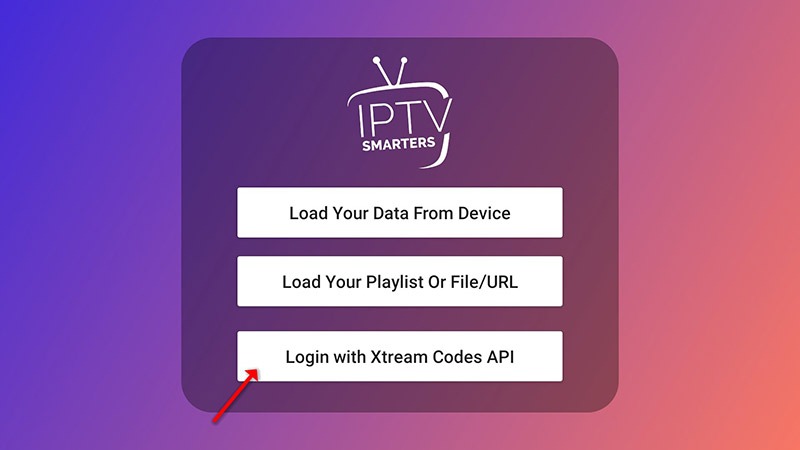
Open the app once installed and click on “Add user” then click on "Login with Xtream Codes API (Also Name: XC API)".
Step 2:
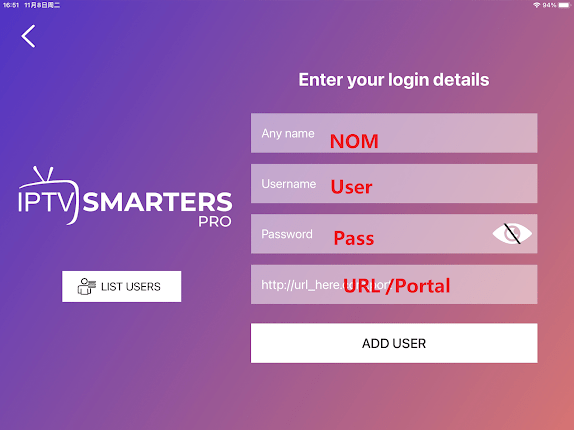
At this point, please fill in all boxes with the account information sent to you by your IPTV provider。
in the first box, select any name you want for example “Startke Live IPTV”.
On the second and third boxes, enter the “Username” and the “Password” and the server URL that we sent you via Whatsapp or Email
Final Click on “ADD USER” to login the account.
Step 3:
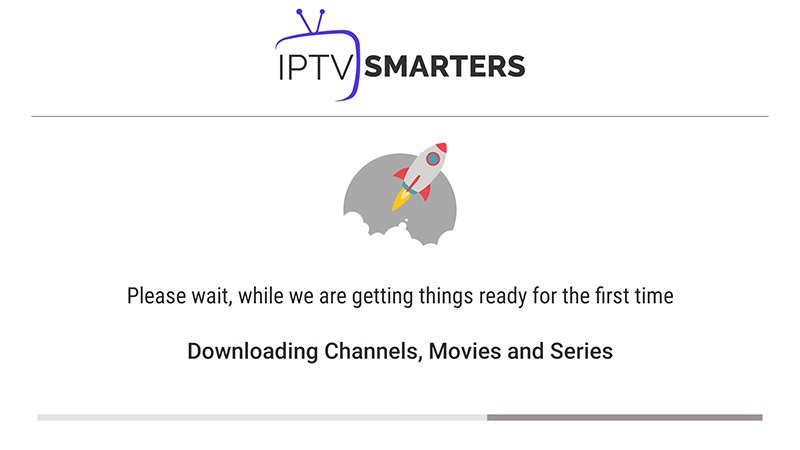
The system will log in and load the account, as our IPTV contains 19,000 live TV channels, and over 90,000 vods, and already 26,000 TV series,
so the log in time may take a few tens of seconds to a few minutes, it's depend on your internet speed, It's best to ensure that you don't switch apps when logging in, otherwise, the programme may not load
Step 4:
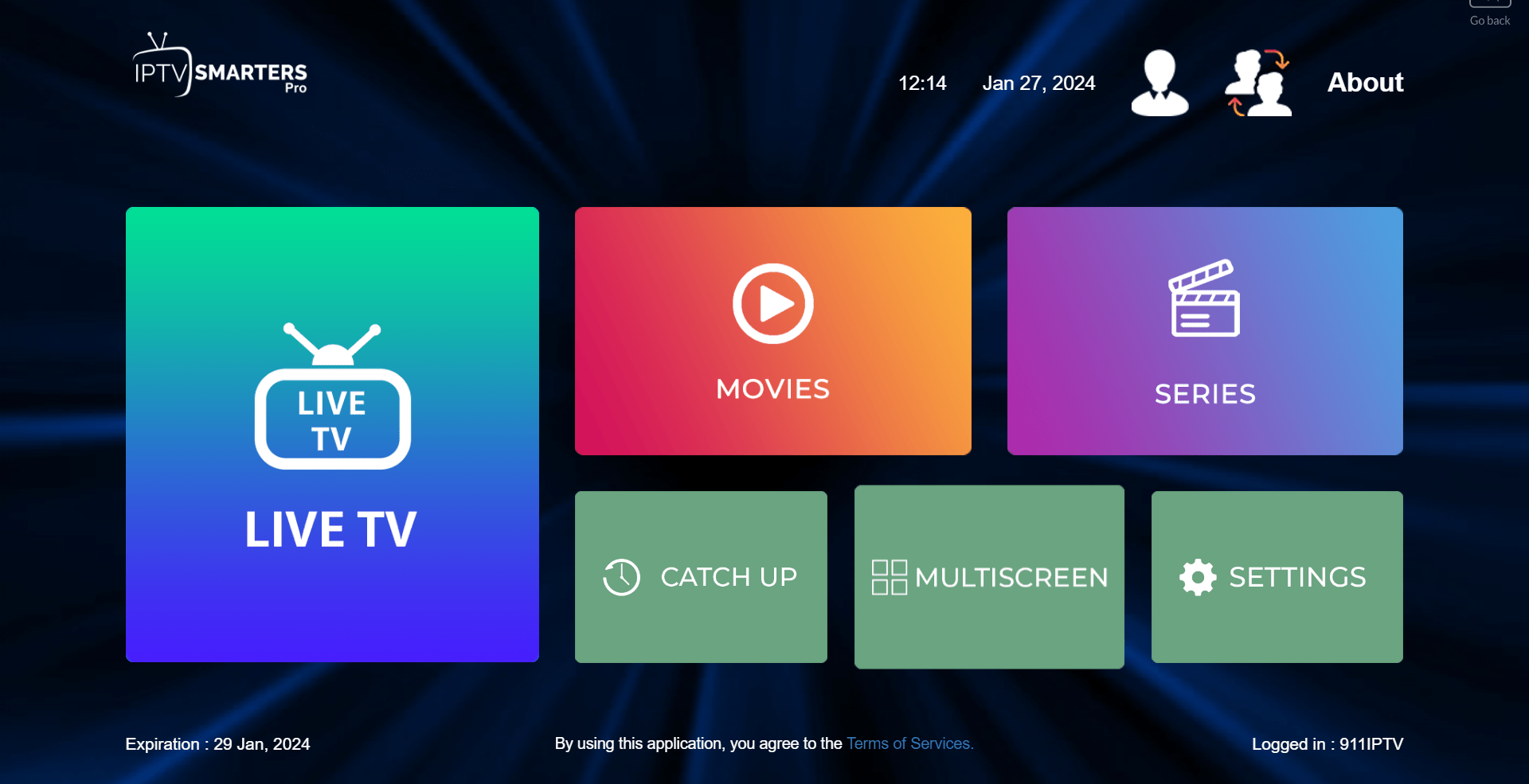
Once you have successfully logged in and clicked on the "LIVE TV" logo, you will see all the channels have been categorised for you by region.
After that, you can enjoy the programme you want to watch!
Please pay special attention! If when you tap on live tv, you find that none of the channels shown, then it means that there was a lag in the network when you logged into your account, please start from step 1 and log into your account again!
Setup IPTV Smarters via M3u Link
In general, we don't recommend using m3u links because they are not as easy to use as the xtream api.
Step 1:
Open the app once downloaded and click on “Add user” then click on “Login with Playlist/URL“.
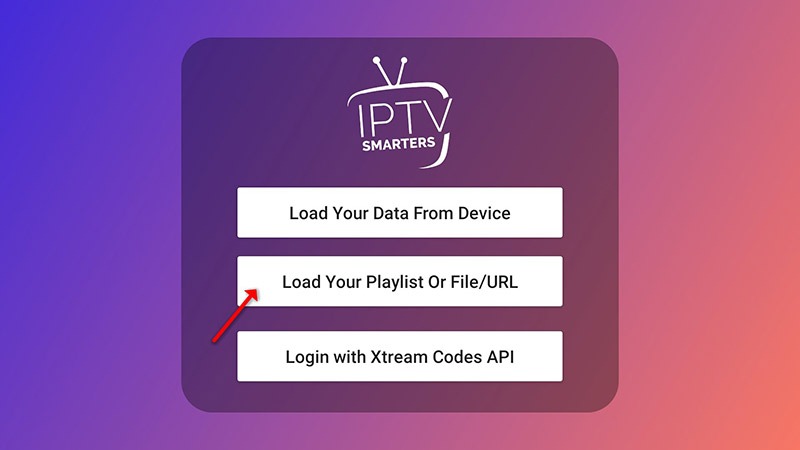
Step 2:
In this step, in the first box, select any name you want for example “IPTV”.
Select “M3U URL” and enter the M3U URL that we sent you via Whatsapp or Email or Chat
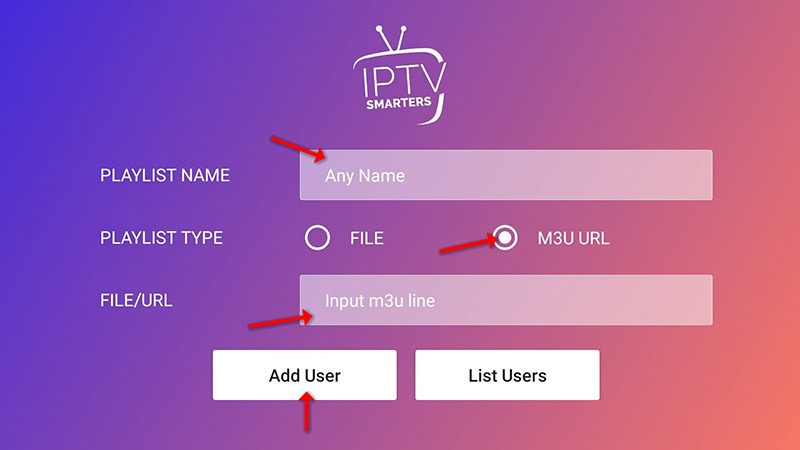
Step 3:
After a short loading period, you can enjoy the IPTV programme!
Usually, click on the left side of the screen to call up the programme list.
Setup IPTV On SmartTV
Dear friend, because there are so many kinds of brands of smart TVs and thousands of models on the market that can support different app, So, we'll show you how to install IPTV Subscription based on the built-in apps!
Important Notice
At present, most apps for smart TVs is subject to a charge; however, there is still some free apps available. As some buyers have already paid to activate the apps, or they can use free apps,so our price does not include the cost of the apps, and users will need to activate it themselves.
App recommendations
IPTV Smarter Pro ★★★★★ (Please do take note! There are over ten different apps with this name, and their icons are almost identical; some are paid, whilst others are free. Try to keep the free ones.)
Web IPTV Smarter Pro Player ★★★★★ (If you don't want to pay anything for the software, then simply choose the web player.)
Smart IPTV ★★★★ (Smartone iptv works basically the same way, but the software activation fee is higher.)
SSIPTV ★★★
Other App ★★★
We recommend searching for ‘Xtream Player’ in the app store,
then downloading 7–10 apps to test them; keep the free ones and delete the paid ones.
IPTV Smarters Guide
My friend, if you have already installed the app, please just click on the Android/iOS Tutorials section, which has very detailed steps!
Web IPTV Smarters Player Guide
The web player is currently a completely free solution (whether it will charge fees in the future depends on the player's developer). Using it is very simple: open the website using your device's built-in browser.
http://webtv-new.iptvsmarters.com/
After selecting the Format Player API (xtream api), enter the account credentials we sent you to log in and start using it.
Smart IPTV Guide
smart iptv offers a 7-day free trial, after which it requires 5 euros for activation, and users should make sure in advance that the software is available on your device!
Step 1:Install Smart IPTV app
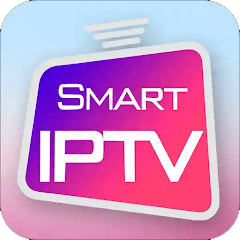
Almost all TVs will have smart iptv in the built-in app market, you can search for it and install it,
please be careful not to install the wrong software, here is the icon of the correct software
Step 2:Get Mac Address
After you install the smart iptv app, please directly launch the app, then the screen will display the following information, the screen will display the 12-digit Mac address, the format is xx: xx: xx: xx: xx: xx ,This is your device's unique mac address.
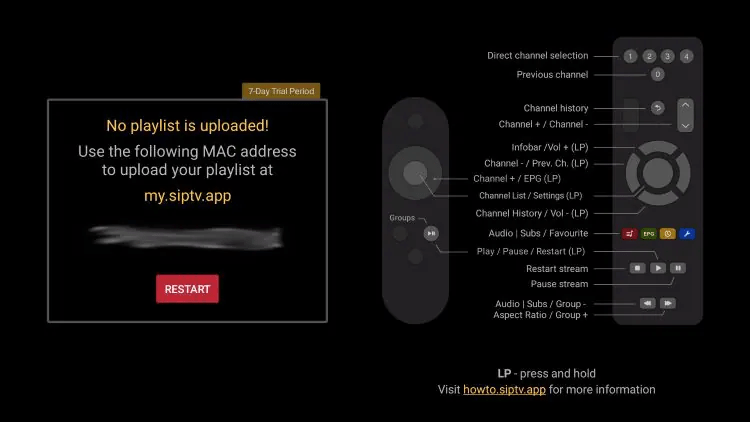
Step 3:Upload m3u link
Visit siptv.app/mylist on any browser and enter your M3U URL (if you don't have IPTV info, click , we will provde you a free test account!) or other playlist link and device MAC shown above. Click Send.
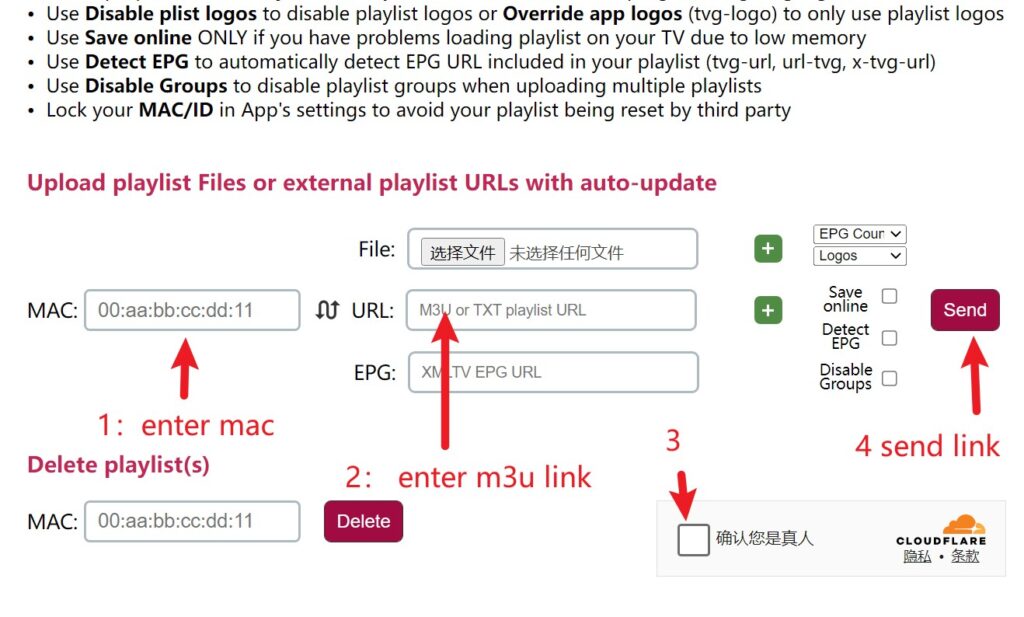
Step 4:Restart Smart IPTV app
After completing step 3, usually the browser page will remind you that m3u was uploaded successfully, please restart the smart iptv app on your TV, at this time, you can restart Smart IPTV, usually, after restarting the app, you can get the program listings to enjoy Startke iptv!
If, after you restart the app, nothing program listings are loading, usually, it is recommended that you re-do step 3!
Setup IPTV Smarters On PC / Laptop
Dear friends, if you want to use IPTV on your computer, then there are more software options available for you.
We would like to highlight 2 software for you
1:IPTV Smarter Pro Software
Step 1:
For windows device, click to download the free IPTV player, and install the software.
For Mac device, click to download the free IPTV player,and install the software.
Step 2:
Open the software once installed and then Enter the login details. (if you don't have IPTV info, click , we will provde you a free test account!)
When the software is opened, the software interface will show you many different ways to log in, there is no doubt, you can directly choose Xtream Codes API (xc api/ xtream code),Without much explanation, all you need to know is that it is much easier to use this way!
Setup IPTV Smarters via Xtream Codes API
Usually, the IPTV provider will send you the account in both xtream api and m3u format, you can prepare the account information in xtream api format
Step 1:
Open the app once installed and click on “Add user” then click on "Login with Xtream Codes API".
Step 2:
At this point, please fill in all boxes with the account information sent to you by your IPTV provider。
in the first box, select any name you want for example “Startke Live IPTV”.
On the second and third boxes, enter the “Username” and the “Password” and the server URL that we sent you via Whatsapp or Email
Final Click on “ADD USER” to login the account.
Step 3:
The system will log in and load the account, as our IPTV contains 19,000 live TV channels, and over 90,000 vods, and already 26,000 TV series,
so the log in time may take a few tens of seconds to a few minutes, it's depend on your internet speed, It's best to ensure that you don't switch apps when logging in, otherwise, the programme may not load
Step 4:
Once you have successfully logged in and clicked on the "LIVE TV" logo, you will see all the channels have been categorised for you by region.
After that, you can enjoy the programme you want to watch!
Please pay special attention! If when you tap on live tv, you find that none of the channels shown, then it means that there was a lag in the network when you logged into your account, please start from step 1 and log into your account again!
2:VLC Player/ PotPlayer
Whether you are using VLC player, PotPlayer or any other player, usually these players can open m3u
Step 1:
Save m3u links sent to you by your IPTV provider, Open this m3u link directly in your browser,After a few seconds, the browser will automatically download a file of a few tens of Mb in size
Step 2:
Find the m3u file you just downloaded and open it with VLC Player or Pot Player.After that, you can enjoy the programme through the player
3:Web Player
Dear friends, if you don't want to download any software, then there is another easiest way to run iptv
Step 1:
You just need to open this website
http://webtv-new.iptvsmarters.com/
Step 2:
Click 1 Stream or Player API, After that, the login is exactly the same as iptv smarter pro
However, the performance of this web browser is weak, so the recommendation index is not as high as the previous two methods.
Setup IPTV Smarters On Fire TV/FireStick
Step1: Prepare sideload app
Select Magnifying Glass and click the Search bar. In the Search window, search for the app called Downloader. Then, open the app’s dashboard and click Install/Get.
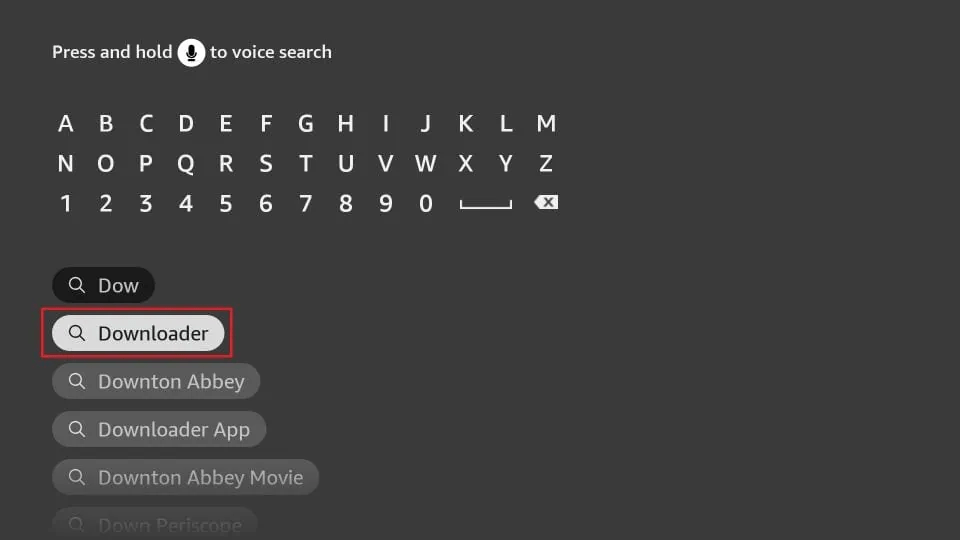 Return to the home screen and select Settings after installing the Downloader app. Next, go to the option My Fire TV and open it.
Step2: Enable Developer Options
go to Settings > My Fire TV
If at this point, scroll through the tabs and if you don't see the Developer option, then select About
If you have already seen the Developer option, you can skip to step 3.
Click on your Fire TV Stick quickly 7 times. You will see a notification at the bottom saying No need; you are already a developer.
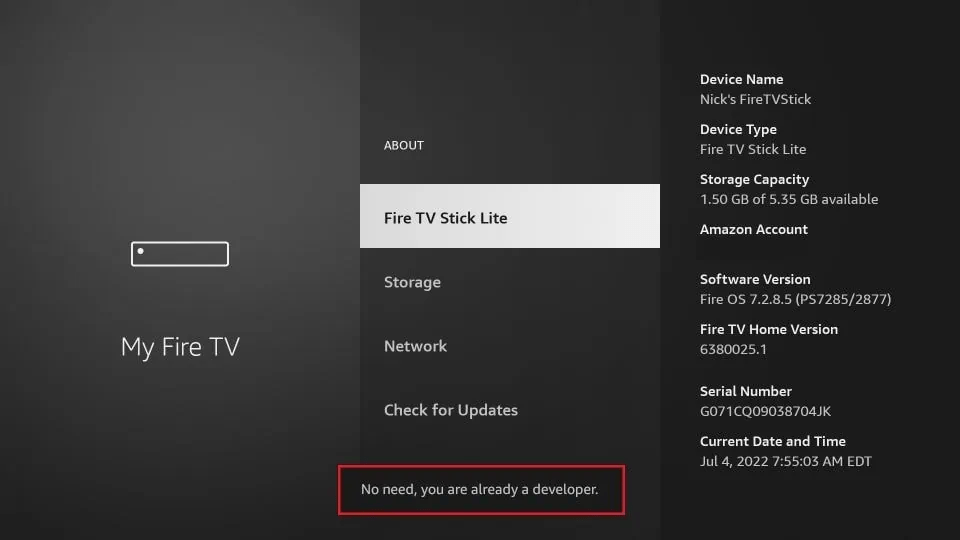
Click the back button on your remote and you will notice Developer Options is now showing within My Fire TV.
Step3: Allow Install Unknown Apps
The next option you will access is the Developer options. In the window that opens next, go ahead and click on Install Unknown Apps. Turn the option ON for the Downloader app.
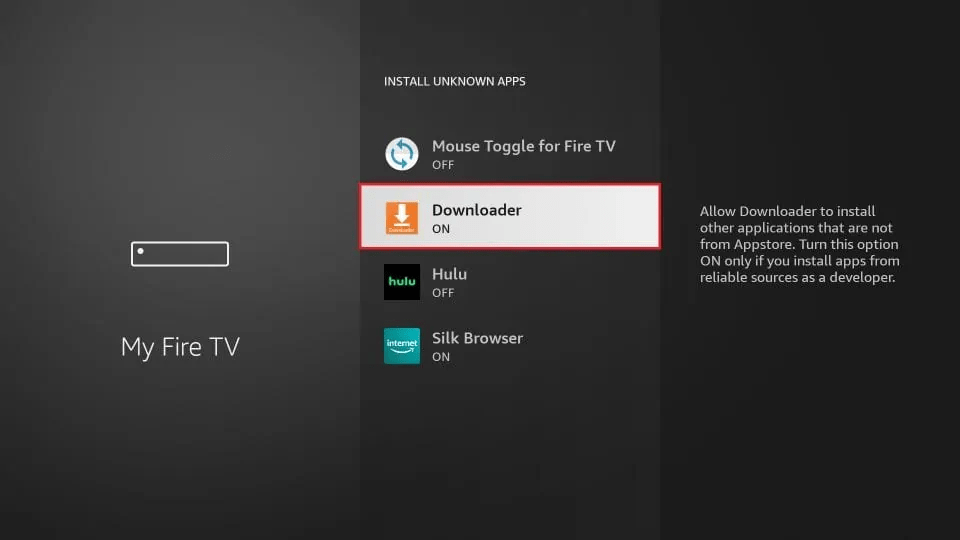
Step4: Install IPTV Smarter Pro app
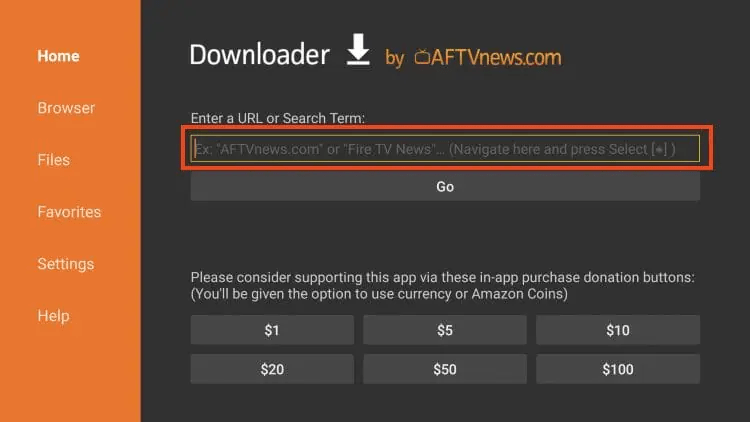
Launch downloader. Hover over the URL bar and click the select button on your remote to open the Keyboard.
There are two ways to download the software.
We recommend using the second method.
Method 1: Search Code 6468112,and then install the app
Method 2: Then enter below link! Please enter 100% of all characters and case correctly!
https://www.iptvsmarters.com/iptv-smarters-5.0.apk
Step5: Succeess intalled the app
After completing the above steps, you can tap OK all the time to successfully install the IPTV Smarter Pro software. After installing the software, You can click on our website Android/iOS Device tutorials to get detailed instruction on how to use the app!
Install IPTV on your Mag Device
Usually the people who use mag devices are experienced users. So please contact me directly via WhatsApp!
 Click on the icon to contact us!
Or Contact +8618503040701